

The short version
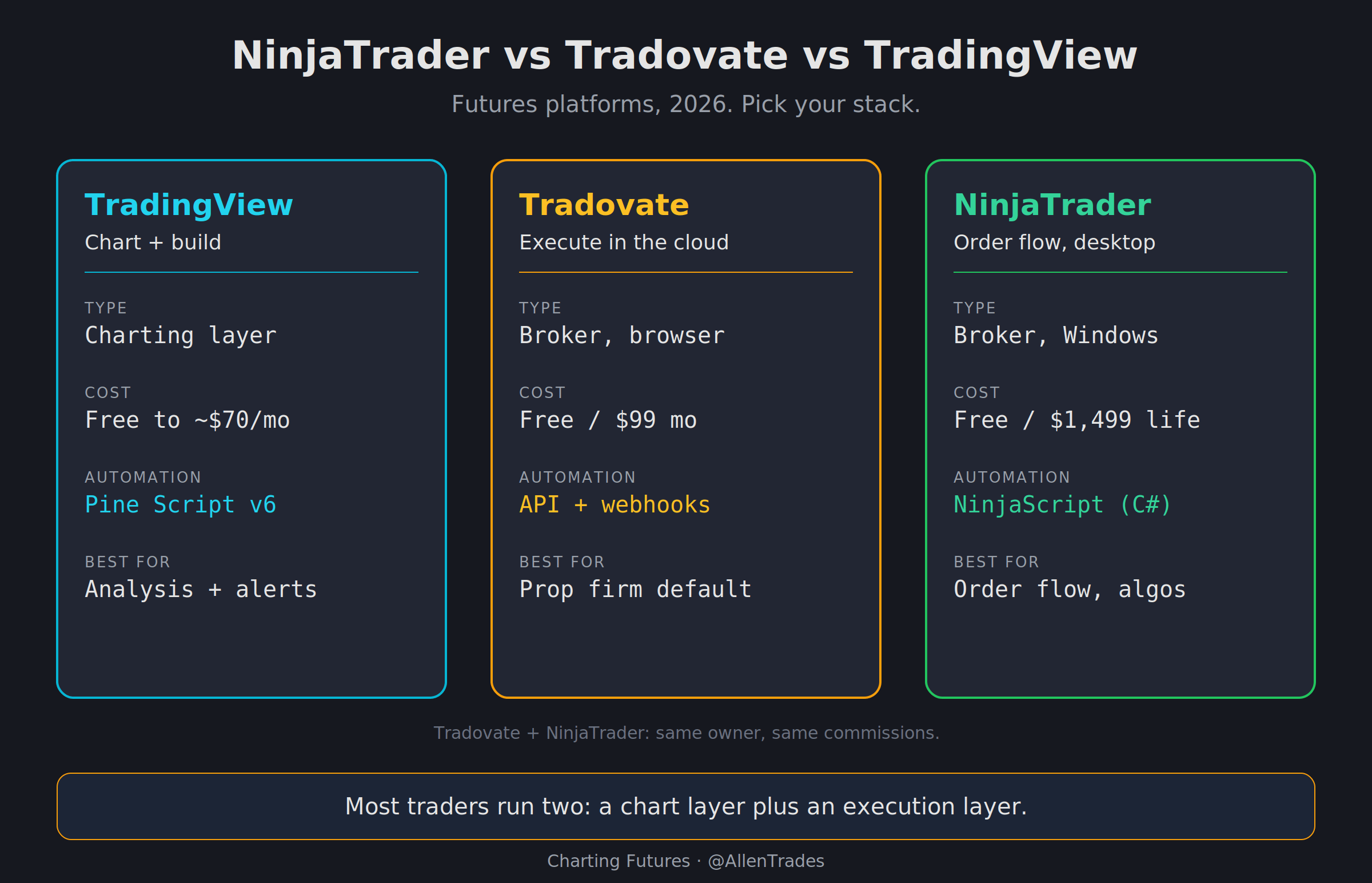
If you only read one line: pick your charting-and-automation layer, then pick your execution layer. They are not the same job, and no single platform is best at both.
TradingView is where you chart, build, and backtest. It is not a broker.
Tradovate is where most people execute, especially on prop firm accounts. Cloud-based, cheap, low friction.
NinjaTrader is the desktop heavyweight. Order flow, deep customization, and automation that runs on your own machine.
Here is the thing nobody selling you a course will say plainly. The “best platform” question is the wrong question. The right question is what each layer of your stack needs to do, and which tool does that one job well.
What each one actually is
NinjaTrader is a Windows-first desktop platform and a regulated futures broker. It is known for the SuperDOM, the Order Flow+ suite, and NinjaScript, which lets you build and automate strategies in a C#-style environment. It has a real learning curve. It is not built for casual traders, and there is no native Mac desktop app. It is now owned by NinjaTrader Group, the same parent that owns Tradovate.
Tradovate is a cloud-native futures broker. It runs in any browser, on desktop, and on mobile, with no license fees and layouts that sync across devices. It was built for the modern prop firm era, which is exactly why most firms ship it as the default. It also acts as a bridge: your Tradovate credentials give you access to the NinjaTrader platform, and it connects to TradingView for charting and execution.
TradingView is a charting and analysis platform, not a broker. It covers millions of instruments, runs the Pine Script language for custom indicators and strategies, and hosts a library of over 100,000 community scripts. You do not execute futures on TradingView itself. You connect it to a broker or a prop firm account and route orders from the chart.
Cost and commissions
This is where the ownership structure matters. NinjaTrader and Tradovate now run the same commission tiers, because they are the same company. Here is the full picture, per side, on futures.

A few honest notes on the numbers:
Exchange, clearing, and NFA fees apply on top of every commission tier above. That is standard at every regulated US futures broker, not a NinjaTrader or Tradovate quirk.
The Lifetime license only pays for itself at volume. Roughly 5,000 micro round turns, or a bit over 1,000 standard round turns, to break even on the
$1,499. If you are not there yet, the Free plan is the honest starting point.TradingView’s subscription is for charting headroom, not execution. Your real execution cost lives at your broker or prop firm. Annual billing shaves about 13% to 17%. Add roughly
$7/mofor non-professional real-time CME futures data.
Automation: the Pine Script hook
Automation is the reason most people run more than one platform, so it deserves its own section.
TradingView (Pine Script) is the most accessible on-ramp to automation in this whole space. Pine Script v6 lets you write strategies, run the strategy tester, and fire webhook alerts that route orders to a connected broker. The community library means you rarely start from zero. If you want to go from an idea to a backtested rule set without learning C#, this is where you start.
NinjaTrader (NinjaScript) is the deep end. It runs on your machine, backtests against tick data, and handles ATM strategies and full automation. More power, more setup, more that can break. Worth it once you have outgrown what a charting-layer script can do.
Tradovate sits in between. It has an API and server-side brackets, and it is the platform that most TradingView-to-prop-firm automation actually routes through. Cloud execution means your setup does not depend on a desktop staying awake.
The pattern that works for most traders: build and test in TradingView, execute through Tradovate, and only move to NinjaScript when you genuinely need the desktop-level control.
Which prop firms support which
If you trade a funded account, this section decides your stack more than price does.
In 2026, Tradovate and NinjaTrader are the two dominant prop firm platforms. Tradovate is the default at most firms because the cloud onboarding fits how evaluations are sold. TradingView usually works as a charting and signal layer that routes through the Tradovate bridge, not as a standalone execution platform.
Support across the firms most of my readers ask about:
Alpha Futures supports Tradovate, NinjaTrader, Quantower, and TradingView (via Tradovate), plus its own in-house options. One catch that trips people up: at Alpha, your platform choice is locked at purchase. You cannot switch mid-account, so choose deliberately.
Tradeify ships Tradovate as the default, with the TradingView add-on routing through it. NinjaTrader is gated behind the Elite Live stage, which unlocks after a payout history. So “Tradeify supports NinjaTrader” is true, but not on day one.
Lucid Trading supports Tradovate, NinjaTrader, and TradingView.
Two more things worth knowing. If TradingView is your primary chart, you usually have to pick Tradovate at checkout to get the bridge. And a known quirk: TradingView can lag the trailing drawdown number shown in your Tradovate dashboard, so keep the dashboard open in a second tab during fast markets.
My stack
I run all three, because each does one job better than the others.
I chart and build in TradingView. My Market Structure work lives there in Pine Script v6, and it is where I test a rule before it ever touches a live account. I execute through Tradovate for prop accounts, because cloud means I can move between machines without losing anything. And I keep NinjaTrader for the sessions where I want the desktop DOM and order flow in front of me.
That is not the only right stack. It is the one that matches how I trade NQ and MNQ. Yours should match how you trade, not how I do.
How to pick, in one pass
New, small account, still learning? TradingView Basic to chart, Tradovate Free to execute. Spend nothing until your volume justifies it.
Prop firm trader? Tradovate first, because it is supported almost everywhere. Add TradingView if you want your charts and scripts on top.
Order flow or heavy desktop automation? NinjaTrader, on Windows, once you have outgrown a charting-layer script.
Mac user? Skip NinjaTrader’s desktop app. Tradovate and TradingView are both browser-based and work fine.
The markets reward consistency, and part of that is not fighting your tools. Pick the stack that gets out of your way.